All your Telegram numbers in one Odoo inbox.
Multi-Account Telegram Integration
Connect real personal Telegram accounts to Odoo Discuss. Every operator keeps their own number, every conversation lands in the CRM your team already runs, and the first message from a new contact becomes a CRM opportunity on its own.
Odoo 18.0 · self-hosted only · the companion service ships with the module
The video plays from YouTube. Nothing loads from YouTube until you press play. Open on YouTube
Specification
- Price
- €129
- Odoo Version
- 18.0 (Self-hosted)
- Dependencies
- DiscussCRMContacts
- Localization
- EN, UK, RU, PL
- License
- OPL-1
- Questions
- hello@doologic.com@doologicAnswered by the author
The situation
Three things that break when sales happens on Telegram
The relationship lives in a handset
Your strongest salesperson talks to clients from a personal number. Nobody else can read that history, no manager can review it, and the day that person leaves, the conversation walks out with them.
A bot cannot speak first
Bot integrations wait for the client to find the bot and press Start. Real sales starts the other way round — you write first, to a phone number, as a person rather than a service.
One account was never enough
Sales, support and whoever covers the weekend each need their own number — on the same Odoo database, without their chats getting mixed together.
One client, many numbers
Same client on two of your numbers? One contact, one deal.
The client is recognised by their Telegram ID. Each number keeps its own chat, but both conversations land on one contact and one CRM opportunity — so before replying from one number you see what was already said from another.
Recognised by Telegram ID
A stable, unique key — and the phone number too, when Telegram shares it.
Full history on the deal
Every message and every reply, from every number, on the contact and the CRM record.
Red duplicate marker
Every later chat with the same client is marked red at once — hover it to see which number they wrote to first and when it last answered.
Before you read further
This module is built for one specific setup
It is not for everyone, and we would rather you find that out here than after paying.
A good fit if…
- You run Odoo 18.0 yourself — on-premise, on a VPS, or on Odoo.sh with custom services.
- Someone on the team can keep a Docker Compose service running next to Odoo. It ships with the module.
- Your operators write to clients by hand — sales and support conversations, not campaigns.
- You want the company, not the handset, to hold the history.
Look elsewhere if…
- You are on Odoo Online. Auxiliary containers are not allowed there, and this module needs one.
- You want mass messaging. Telegram's terms prohibit it from personal accounts, and the module enforces daily limits against it.
- You only need notifications out of Odoo. A standard Telegram bot is simpler and free.
Not sure about your setup? Describe it to us — we will tell you honestly whether the module fits.
What changes
Three things you did not have yesterday
The conversation belongs to the company
History stops being private property and becomes a company record.
No "one account per database" ceiling. Give each number a nickname — "Warsaw desk", "Sales 2" — and it names every chat and every message, so conversations never get mixed up.
One company number can be worked by a whole team: colleagues see every conversation of the account and reply — without a Telegram account of their own.
Read and answer without leaving Odoo, laid out like a messenger: the client on the left, your team on the right. Replies sent from the operator's own phone show up too, with no duplicates. Messages that came in while your server was off arrive in order, with the time they were written. Only private chats arrive by default — a number's groups and channels stay out.
Every first message and every phone lookup is recorded with the operator and the date. Managers see who contacted whom.
Leads appear without retyping
The first message from a stranger is already a CRM record.
A new contact's first message puts an opportunity in your pipeline — or a lead, if you use Leads — pre-filled with the partner record and the message body, tagged source Telegram, medium Direct.
One button on the contact form tells you whether that phone number is on Telegram — so operators write first only to people they can reach.
sending → sent → read, updated in real time without reloading the page.
Emoji reactions sync both ways, and inbound photos up to 20 MB land inline in Discuss.
Numbers that don't get burned
A personal account is an asset. The module treats it like one.
Caps on cold first messages and on phone lookups, set per account and driven by the audit log.
When Telegram signals peer-flood, the account stops on its own instead of digging deeper.
Telegram sessions are stored Fernet-encrypted in your own database. Not on our servers — there are none.
Disconnecting an account revokes its Telegram session immediately.
Getting started
Three steps, not an integration project
Install it and start the service
Drop the module into your addons path and bring up the companion service with docker compose up. It talks to Telegram; Odoo talks to it through PostgreSQL. No broker, no third-party cloud.
Connect an account
An operator's account is linked from inside Odoo through Telegram's own device linking — the same mechanism Telegram Desktop uses, 2FA included. Once per operator.
Work in Odoo
Chats arrive in their own Discuss section and new contacts become CRM opportunities. Nobody has to open the Telegram app to do their job.
Honest comparison
Three ways a company runs Telegram
Most teams are already doing one of the first two. Here is what each actually gives you.
| A personal phonewhat most teams do today | A shared botthe standard Bot API | This modulepersonal accounts in Odoo | |
|---|---|---|---|
| Who holds the history | The operator | The company | The company |
| Writing first | Yes, from a real number | No — the client must find the bot and press Start | Yes, from a real number |
| How many numbers | One per person, none of them shared | One bot for the whole company | One per operator, and a team can share any of them |
| Where the team works | The Telegram app, next to personal chats | Odoo, through whatever webhook logic you build | Odoo Discuss, out of the box |
| What the CRM sees | Nothing | Whatever you wrote code for | Chats, automatic opportunities and the outbound log |
See it inside Odoo
Real screenshots from a stock Odoo 18 database with the module installed.
Messages land within a second
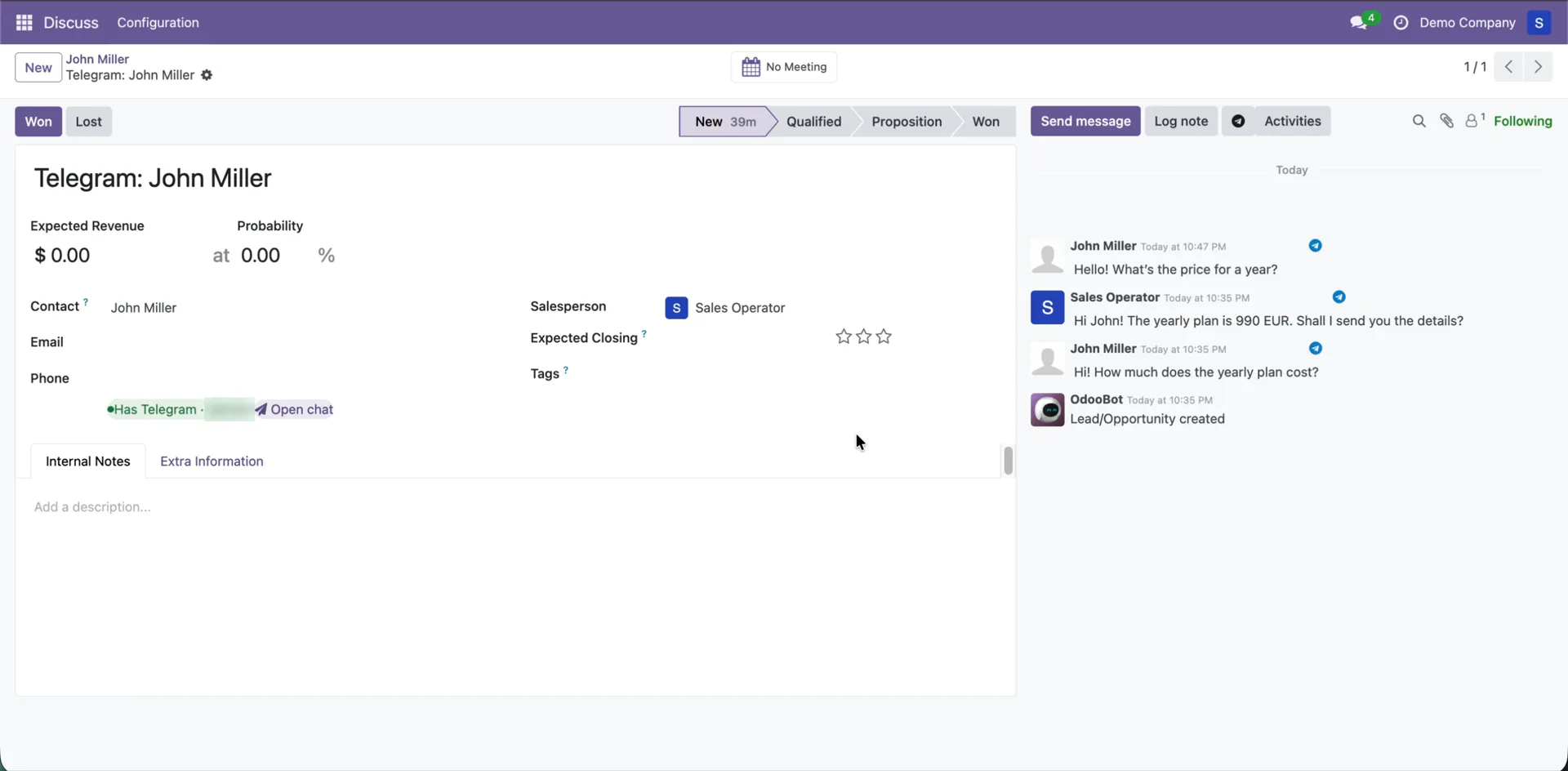
A client writes on Telegram: the chat appears in the Telegram section of Discuss, and the contact and the CRM opportunity are created on their own.
More on our YouTube channel
Walkthroughs of the module and of the Odoo work around it. The video above is the full tour; new ones go there before anywhere else.